
Booking your first therapy session online shouldn’t feel harder than the thing you’re booking it for. This guide walks you through booking a therapy session on Mytherapist.ng — from signing up to joining your first call — in about five minutes.
Therapy works best when getting started is easy. With Mytherapist.ng, you can book a therapy session online in Nigeria, choose from verified, licensed therapists, pick a time that fits your schedule, and pay securely — all from your phone. No referrals, no waiting rooms, no awkward phone calls.
Below is the exact, step-by-step process, with screenshots from the app at each stage.
In a hurry? The whole flow is: Sign up → Choose a therapist → Pick a date & time → Add a short note → Pay → Join. Read on for the details.
What you’ll need before you start
- The Mytherapist.ng app (iOS or Android) or the web app.
- An email address and phone number to create your account.
- A payment method — your debit card, a bank transfer, or your in-app wallet.
- About 5 minutes. That’s it.
💚 If your employer, HMO, or insurer sponsors your therapy, your sessions may be free to you. See our separate guide: Booking with your organisation or HMO benefits.
Step 1 — Create your account or log in
Open the app and tap Create Account to sign up, or Login if you already have an account.
- New here? Sign up with your name, email, and a password, then verify your email.
- Returning? Log in with the email and password you used before.
For full help with sign-up, verification, or password resets, see Account access and login.
Step 2 — Find a therapist
From the Therapy tab, tap Featured Therapists → View More to browse everyone available. You can also:
- Search by name or specialty (e.g. “anxiety”, “relationships”, “grief”).
- Browse by Specialty to find a therapist for a specific concern.
Each therapist card shows their name, focus areas, rating, and price per session.
🔎 Not sure who to pick? That’s normal. Start with someone whose focus areas match what’s on your mind. You can always switch therapists later — your first choice isn’t permanent.
Suggested read: What Therapy Costs in Nigeria in 2026
Step 3 — Check the therapist’s profile
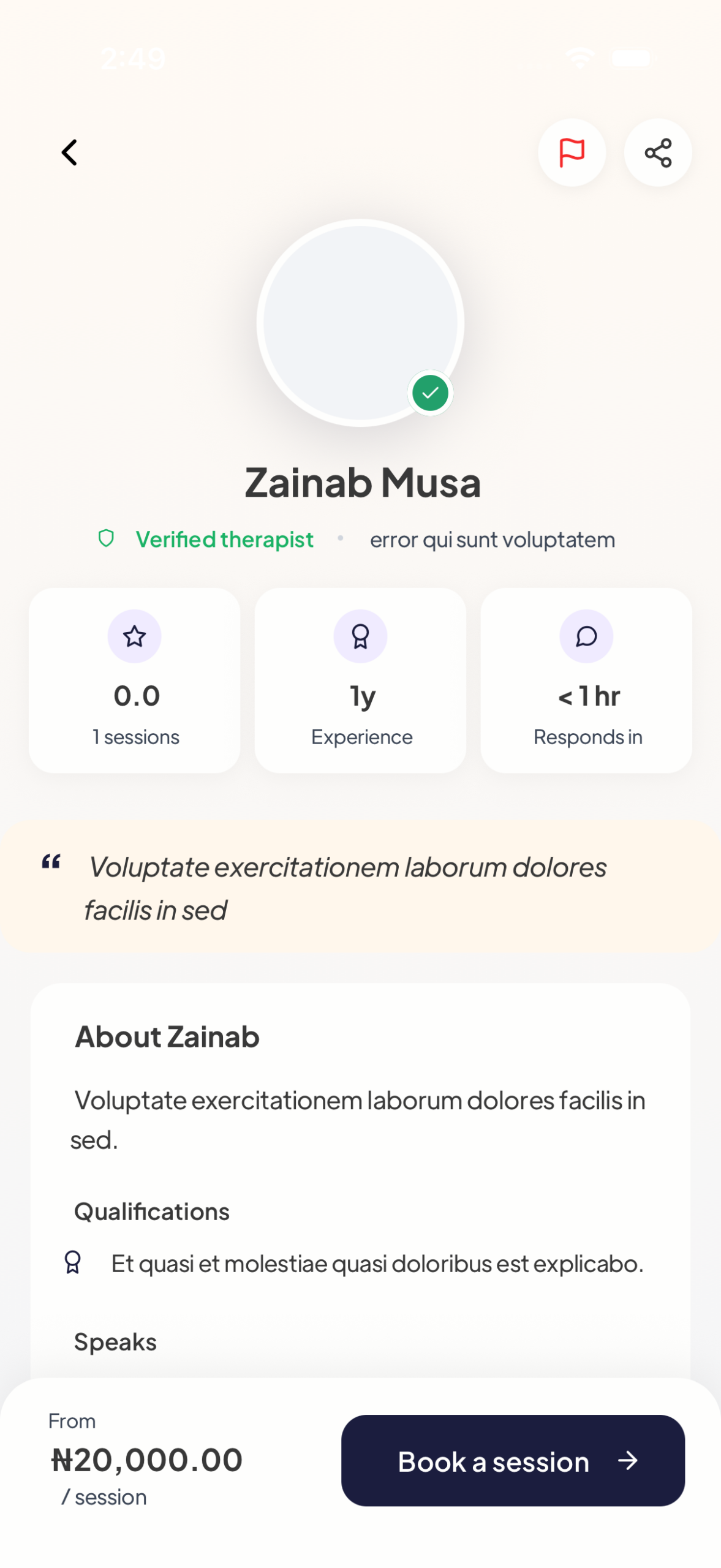
Tap any therapist to open their profile. Here you can read everything you need to choose with confidence:
- ✅ Verified therapist badge (every therapist is vetted and licensed).
- Years of experience and typical response time.
- About, qualifications, and languages spoken.
- Their price per session.
When you’re ready, tap Book a session.
Step 4 — Pick a date and time
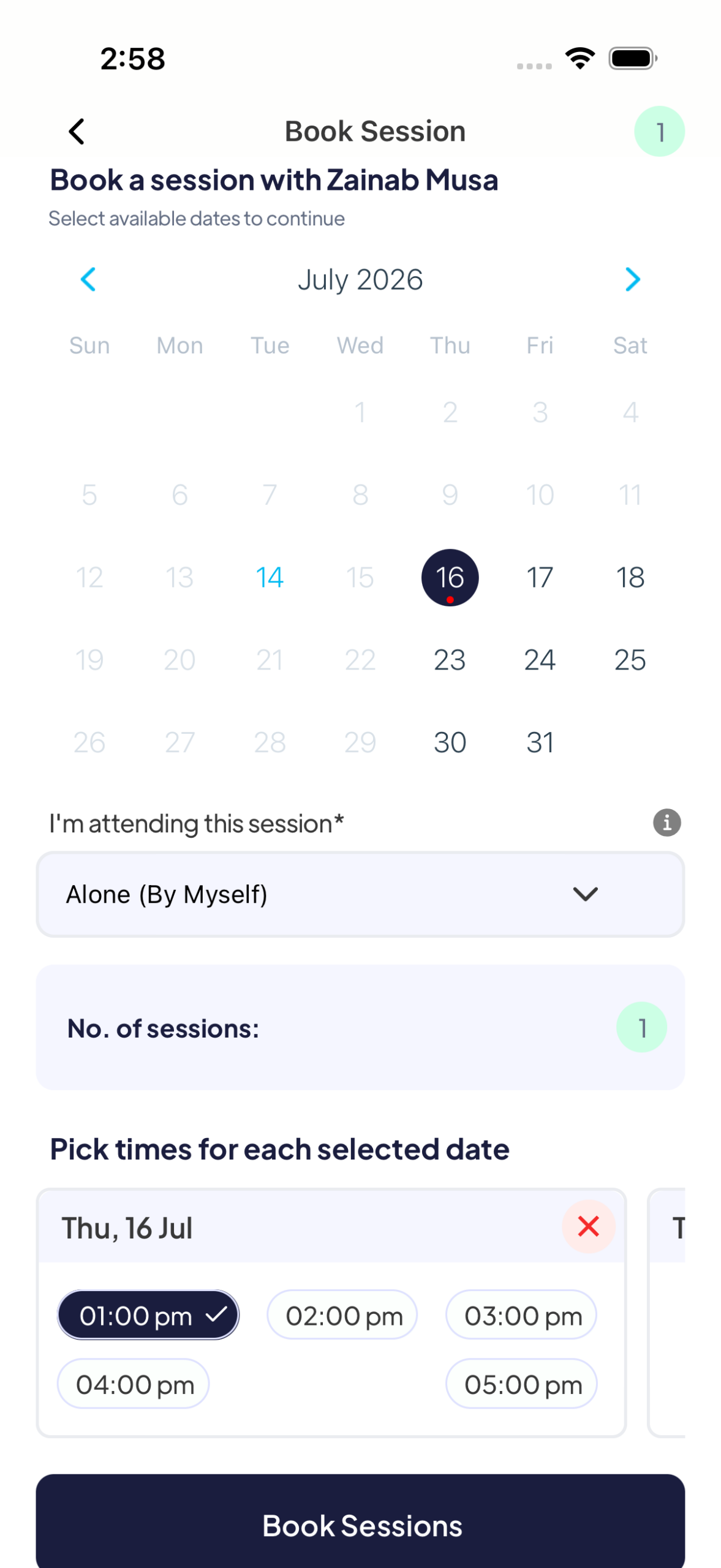
Choose a day from the calendar, then pick an open time slot. A few things to know:
- Each therapist sets their own days and hours — only the days they’re available are selectable.
- Many therapists don’t offer same-day sessions, so pick a future date.
- Choose whether you’re attending alone (by yourself) or as a couple (if the therapist offers couples sessions).
- You can book one session or several at once.
Step 5 — Tell your therapist what’s on your mind
Before payment, you’ll add a little context so your therapist can prepare. You’ll see “What’s bringing you in today?” with quick options like Work stress, Anxiety lately, or Just need to talk — tap one or write your own. There’s also an optional “Anything else your therapist should know?” box.
This step is short on purpose: a sentence is enough. It means your first session can focus on you, not on filling in background.
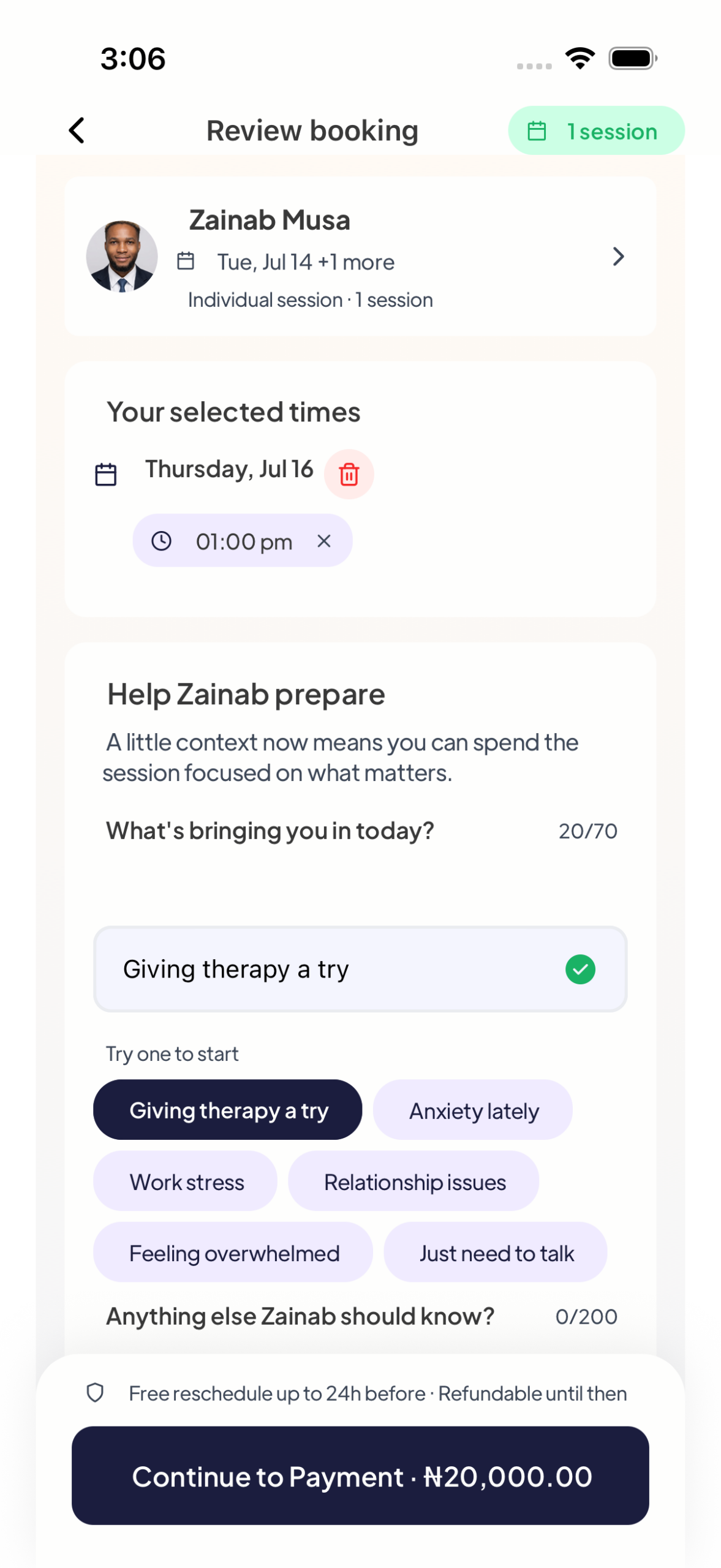
🛡️ Good to know: sessions are free to reschedule up to 24 hours before and refundable until then — so booking early is risk-free.
Step 6 — Pay securely and confirm
Choose how you’d like to pay:
- Wallet — top it up in advance for one-tap booking.
- Card (via Paystack) — pay securely with your debit card.
- Bank transfer — pay directly from your bank.
You’ll see the session fee and a Pay · Book session button. Payments are processed securely by Paystack, so your card details are never stored in the app. Have a discount? Tap Have a coupon? to apply it. Prefer privacy? Toggle Book anonymously.
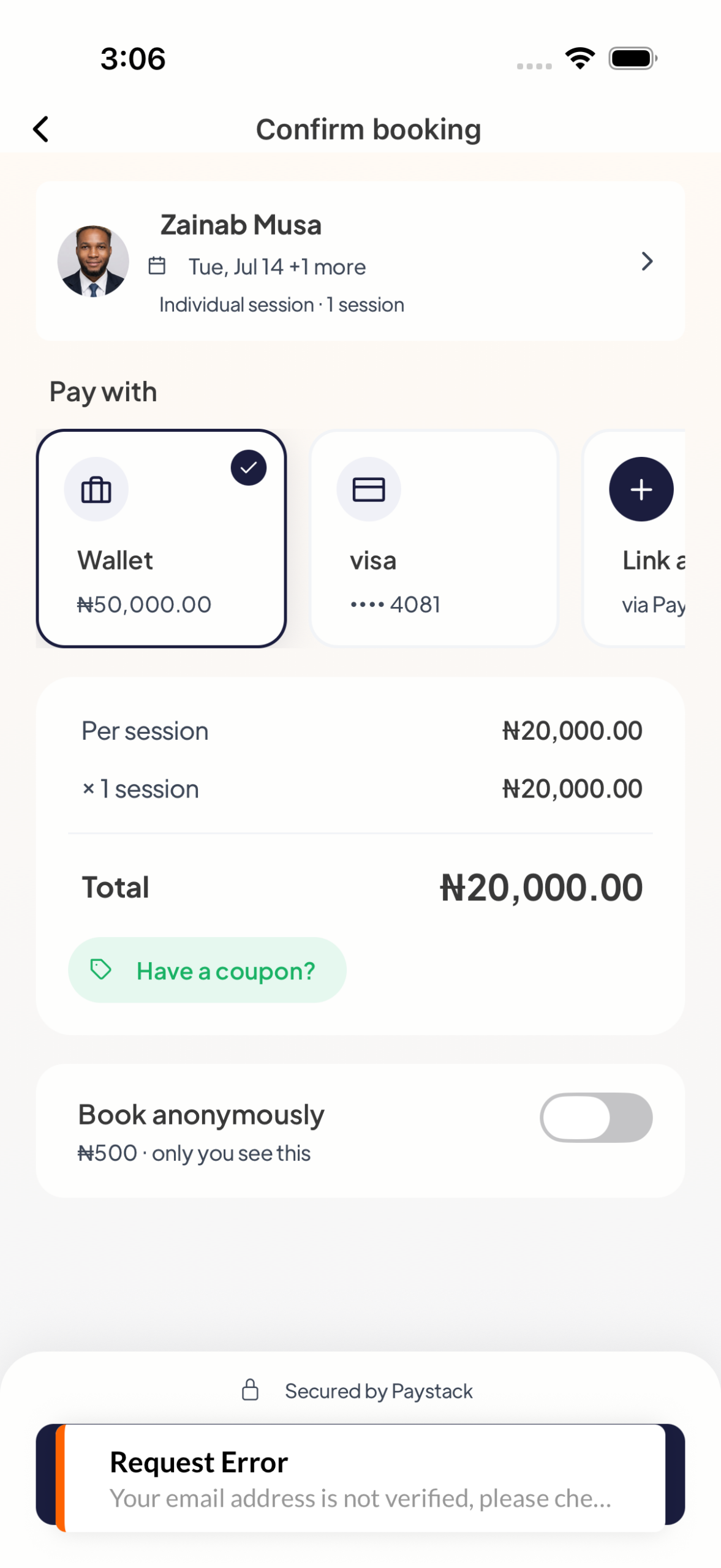
Tap Pay · Book session to finish. For more on wallets, cards, and refunds, see Payments, wallet, and refunds.
Step 7 — You’re booked! Get ready for your session
You’ll land on a confirmation screen: “Your session is set.” Your therapist is notified and your appointment shows under Appointments.
Suggested read: Pricing Your Therapy Practice in Nigeria
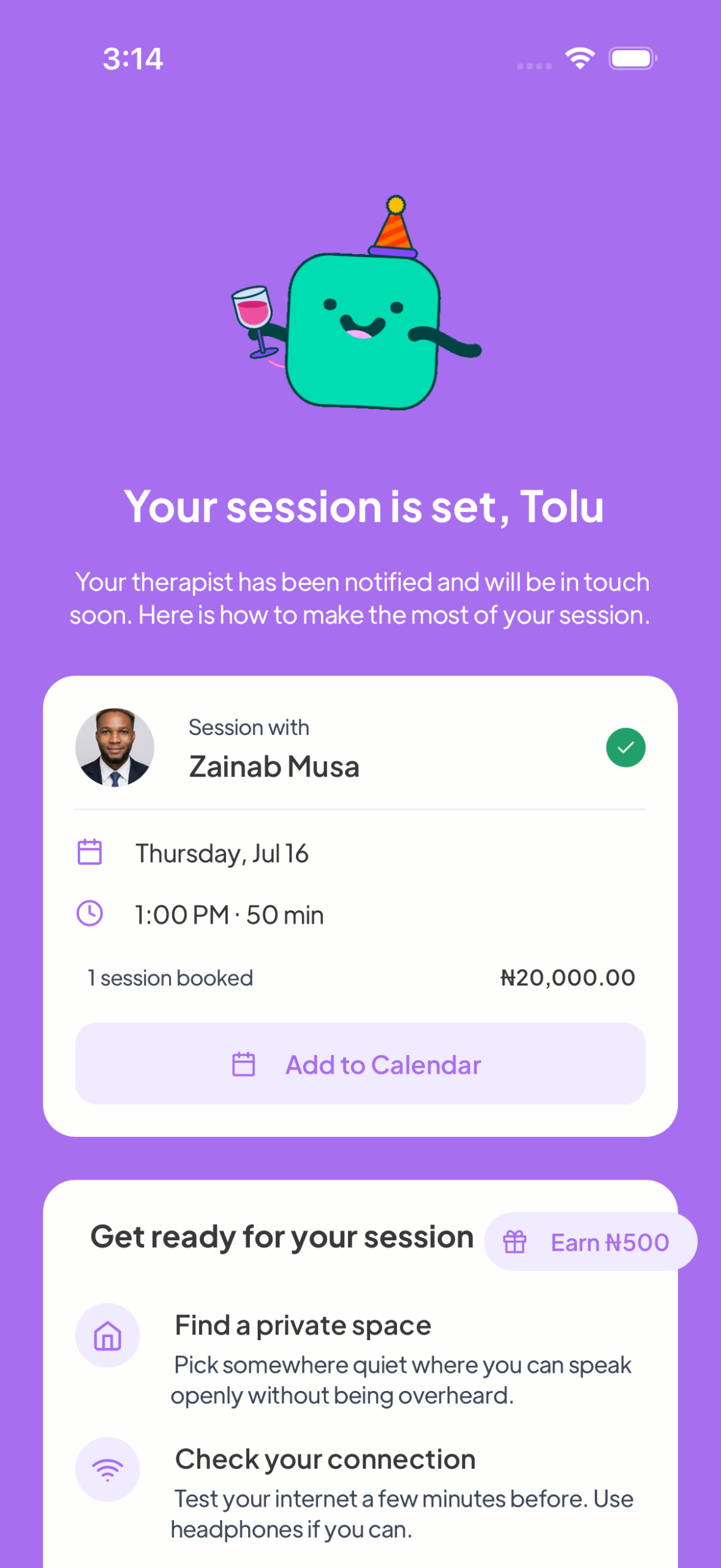
A few last things:
- Your session starts as pending until the therapist accepts it — you’ll get a notification when they do.
- Tap Add to Calendar so you don’t miss it.
- Before your session: find a private, quiet space, test your internet, and jot down what you want to talk about.
- At your session time, open the appointment and join the video or audio call in-app. (See Video and audio sessions.)
How much does a therapy session cost on Mytherapist.ng?
Each therapist sets their own rate, so prices vary — in this guide you’ll see therapists priced between ₦16,000 and ₦20,000 per session. The exact fee is always shown on the therapist’s profile and again at checkout before you pay, so there are no surprises. You can pay per session — there’s no subscription required to book.
Tips for booking your first therapy session
- Match the therapist to your concern, not just the price. Fit matters more than a few naira.
- Book a future slot — most therapists don’t take same-day bookings, and a little lead time means a better choice of times.
- Write one honest line in the “what’s bringing you in” box. It helps your therapist help you faster.
- Add it to your calendar and set a reminder. Treat it like any important appointment.
- It’s okay to switch. If your first therapist isn’t the right fit, book a different one next time — no hard feelings, it’s part of the process.
Frequently asked questions
How do I book a therapy session online in Nigeria?
Open the Mytherapist.ng app, create an account or log in, go to the Therapy tab, choose a verified therapist, pick an available date and time, add a short note about why you’re booking, then pay securely with your wallet, card, or bank transfer. Your session is confirmed once the therapist accepts.
Do I need a referral to see a therapist?
No. You can browse therapists and book directly — no referral or doctor’s note required.
Can I choose my own therapist?
Yes. You can browse all available therapists, search by name or specialty, and read each profile before booking. You’re free to choose a different therapist for future sessions.
How much does online therapy cost in Nigeria?
It depends on the therapist. Rates are shown on each therapist’s profile and at checkout before you pay — in this guide, sessions range from ₦16,000 to ₦20,000. There’s no subscription; you pay per session.
How do I pay for my session?
You can pay with your in-app wallet, a debit card (processed securely by Paystack), or a bank transfer. You can also apply a coupon code if you have one.
Can I reschedule or cancel?
Yes. Sessions are free to reschedule up to 24 hours before, and refundable until then. See Payments, wallet, and refunds for details.
Is my therapy session private and confidential?
Yes. Your sessions are confidential, and you can even choose to book anonymously. Payments are handled securely by Paystack and your card details are never stored in the app.
What happens after I book?
Your appointment is created as pending until the therapist accepts it. You’ll get a notification, can add it to your calendar, and join the video or audio call in the app at your session time.
Suggested read: Licensing and CPD for Therapists in Nigeria
Is online therapy effective?
Research consistently finds online therapy can be as effective as in-person care for many common concerns like anxiety and depression. To learn more about mental health generally, see the World Health Organization’s mental health resources.
Ready to start?
Booking therapy on Mytherapist.ng takes about five minutes: sign up, pick a verified therapist, choose a time, pay securely, and join your session. Taking that first step is often the hardest part of feeling better — and now you know exactly how.
👉 Open the Mytherapist.ng app and book your first session today.
Related guides
- Booking through your organisation or HMO benefits
- Booking and appointments
- Video and audio sessions
- Payments, wallet, and refunds
- Account access and login
Last updated: 23 June 2026. Steps and screenshots reflect the live Mytherapist.ng app, verified end-to-end.